
If you run one AI agent, you don't need a system to manage it. You open the chat, you see what it's doing, you answer its question. The trouble starts at five agents, gets real at ten, and by thirty you are spending a meaningful part of your day just finding out what your agents are up to. Which one is still working? Which one has been waiting for my approval since this morning? Which one quietly stopped two days ago and nobody noticed?
That gap is what an Agent Management System (AMS) fills. This post explains what an AMS is, how it differs from the LLM observability tools you may already know, what features actually matter, and how to tell whether you need one yet.
What is an Agent Management System?
An Agent Management System is a single place where a person who operates AI agents can see and manage all of them at once, regardless of which tool each agent runs in. Think of it as mission control for a fleet: one screen that answers three operational questions in real time.
- Who is working right now? Live status for every agent, not a log you have to dig through later.
- Who needs me? Agents blocked on a human decision, such as an approval, a missing credential or a clarifying question, surfaced so you can unblock them.
- Who has gone quiet? Agents that haven't reported anything in a while, which usually means they stalled, finished without telling anyone, or were never really set up.
The key word is operate. An AMS is built for the person running the agents day to day: a founder with agents spread across several businesses, an automation agency running agents for clients, or a small team with coding agents going in parallel. It is not primarily a debugging tool for the engineer building an LLM application, although the same person can wear both hats.
AMS vs LLM observability: two different jobs
The closest existing category is LLM observability: tools like Langfuse, LangSmith, AgentOps and Helicone. They are excellent at what they do, and it is worth being precise about how that differs from agent management.
| LLM observability | Agent management (AMS) | |
|---|---|---|
| Main question | What happened inside this trace or LLM call? | What is each of my agents doing right now, and who needs me? |
| Primary user | Developer building an LLM app | Operator running many agents |
| How data arrives | SDK instrumentation, OpenTelemetry or a proxy in front of model calls | The agent reports its own status, often through a tool call such as MCP |
| Unit of attention | A trace, span or request | An agent and its current state |
| Typical output | Trace trees, evals, prompt versions, latency and token charts | Status lights, an activity feed, approval queues, "gone quiet" warnings |
Observability looks inside the model call. An AMS looks at the outside of the agent: its state, its progress and whether a human is in the loop.
Observability tools see the inside of the model calls. An AMS sees the outside of the agent: its state, its progress and whether a human is in the loop. If you build LLM products, you probably want observability. If you run a lot of agents, you probably want an AMS. Plenty of people need both, and they do not conflict.
Why running many agents breaks down
Agents are now cheap to start. You can spin one up in Grok Bot, kick off a Claude Code or Codex session, start a Cursor background agent, and wire a workflow agent into an automation tool, all in an afternoon. Each of those tools has its own interface, its own notifications (or none), and its own idea of what "done" means. The operational problems that follow are predictable.
Missed approvals
Well-designed agents stop and ask before doing anything risky: sending an email, spending money, merging code, deleting data. That is good. But an approval request sitting in one of ten different chat windows is easy to miss, and an agent waiting on you does nothing. The needs_approval state is arguably the most expensive one to overlook, because the work is done except for your two-second decision.
Silent stalls
Agents fail in ways that don't announce themselves. A session times out, a credential expires, a loop ends early. Without a central view you find out when you go looking, which may be days later.
Context switching
Checking every agent means opening every tool. At ten agents, a quick round of checks turns into a recurring chore, and the chore gets skipped.
No shared picture
If a partner, client or teammate asks "what are the agents doing?", there is no single place to point them.
Core features of an Agent Management System
Different products will draw the line differently, but these are the capabilities that make an AMS worth having.
1. Live status for every agent
A small set of clear states beats a wall of logs. At minimum: working, needs approval and idle. Each state should be visible at a glance, with a short one-line summary of what the agent is doing or what it needs.
2. A live activity feed
Short progress notes ("drafted the newsletter", "opened the pull request", "waiting on invoice approval") in time order across all agents. This is the narrative layer: not every tool call, just the milestones a human cares about.
3. Approvals surfaced, not buried
Agents waiting on you should stand out visually and ideally be easy to jump to. An AMS should surface and route approvals; it should not quietly act on your behalf.
4. "Gone quiet" detection
Agents that haven't reported in a while should be flagged, so stalls are noticed in hours rather than days.
5. Cross-tool connections
The whole point is one window for agents that live in different places. A good AMS connects to many agent runtimes through a common protocol rather than a separate SDK for each.
6. Lightweight by design
An operations dashboard is something you leave open all day. It should start fast, use little memory and stay out of the way.
Why MCP is the right foundation
The Model Context Protocol (MCP) is an open standard for giving AI models access to tools. Many agent harnesses already speak it, including Claude Code, Cursor, Codex and Grok Bot. That makes it a natural transport for an AMS: instead of instrumenting each agent with a vendor SDK, you give every agent the same small reporting tool and ask it to call that tool at the right moments.
If a harness can call an MCP tool, it can report to an AMS. No SDK, no proxy.
The result is a model where the agent tells you its state, in plain language, at the moments that matter: when it starts a task, when it hits a milestone, when it needs you and when it's done. That is a much better fit for operations than reconstructing state from raw traces. We walk through exactly how this works in MCP for monitoring: report agent status with 3 tools.
Do you need an AMS yet?
A quick, honest checklist. You probably don't need one if you run one to three agents in a single tool and check them when you use them. You probably do if several of these are true:
- You run agents in more than one tool (for example Grok Bot plus Claude Code plus Cursor).
- You have more than about five agents doing ongoing work.
- You have missed an approval request, or found out late that an agent stalled.
- You open several apps just to check on progress.
- Someone else needs to know what your agents are doing.
If you are an engineer whose main problem is "why did this LLM call return garbage?", start with an observability tool instead. Our comparison pages are candid about when that is the better choice.
Why we built AgentPilots
I built AgentPilots because I run a lot of agents across my family's businesses, and keeping track of them through a dozen chat windows stopped working. I wanted one small window that showed me, live, who was working, who needed me and who had gone quiet.
AgentPilots is that window. Today it is a lightweight Windows desktop app in private beta. Agents connect through an MCP connector with three tools: report_status (working, needs approval or idle, with a one-line summary), report_step (a short progress note) and report_message (a record of a message the agent already sent). The app shows:
- Working indicators: a pulsing ring and a running timer on agents that are working, and a distinct amber state for agents that need your approval.
- Live activity: cards with the agent, its state, the current task, how long it has been running and its latest message, with recent steps one click away.
- Graph view: your agents grouped visually so a large fleet stays readable.
- Connections: setup snippets for Grok Bot, Claude Code, Cursor and Codex, plus Claude Desktop through the
mcp-remotebridge. ChatGPT is not supported yet.
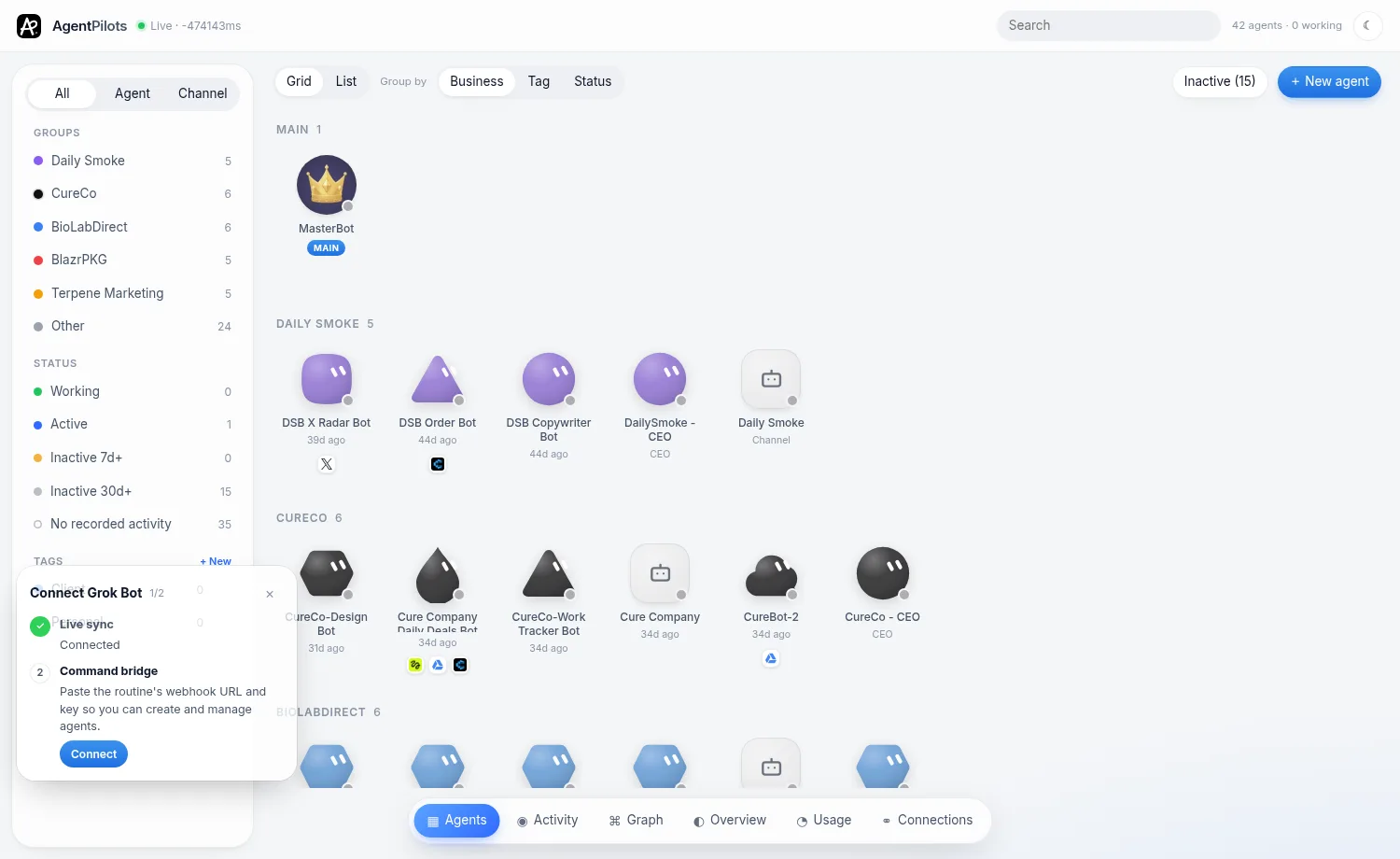
It is deliberately small. There is no SDK to install and no proxy in front of your model calls. It is an early product and Windows-only for now, and we are building it in public. Usage and cost tracking, an approvals inbox and macOS are on the roadmap, not shipped, and we will say so plainly until they are.
Key takeaways
- An Agent Management System is mission control for people who operate many AI agents: live status, activity, approvals and "gone quiet" detection in one place.
- It complements LLM observability rather than replacing it. Observability looks inside model calls; an AMS looks at the agent's state.
- MCP makes cross-tool agent management practical, because agents can report their own status through one small, shared tool.
- You likely need one once you run more than a handful of agents across more than one tool.
Your agents, one window.
AgentPilots is in private beta. Join the waitlist and we'll email you a download link when it's ready.